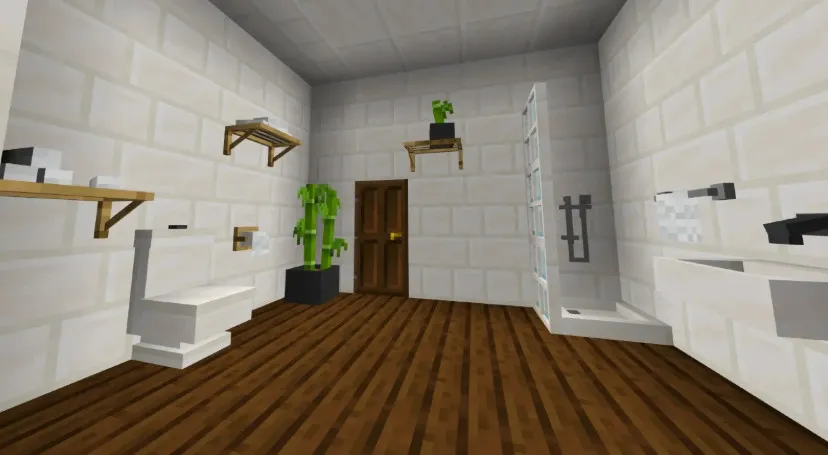
Modern Furniture is an Add-On specifically designed for Minecraft: Bedrock Edition, dedicated to decoration. It aims to provide players with a vast array of modern-style furniture and building materials, helping you create living spaces that are both aesthetic and functional. It is a powerful tool for builders focusing on interior and exterior design. This add-on features over 800 pieces of furniture and decorative blocks, covering a wide range of categories—from daily living essentials to outdoor landscapes—making your builds more vibrant and diverse.
Core Features & Highlights
To meet the decoration needs of different players, the add-on offers a highly diverse range of furniture components:
- Modular Sofas: Support modular arrangements and are functional, serving as both decoration and practical furniture.
- Bookshelves: In addition to offering various styles, you can customize how books are displayed on the shelves.
- Miscellaneous Decor: Includes hundreds of potted plants, vases, books, statues, and household items, greatly enhancing the indoor atmosphere.
- Kitchen Furniture: Provides modular cabinets and countertops to help you create a modern kitchen space.
- Lighting Fixtures: All lamps are functional; you can turn them on or off with a simple interaction (click).
- Table & Chair Sets: Features countless color and material combinations; chairs are interactive and can be sat on.
- Ventilation Pipes: Practical piping and grill modules that can be opened or shut manually to add industrial-style details.
- Carpets & Curtains: Offers various carpet designs and curtains that can be toggled with a single click.
- Garage Doors: Equipped with functional garage doors controlled by levers, making buildings more realistic.
- Trash Cans: Highly practical; simply drop items above the trash can to delete them instantly.
- Calendar: Records the number of days you have spent in your game world; click it to view the complete timeline of your adventures.
Design Philosophy & Style
The design language of Modern Furniture pursues simplicity and modernity. While maintaining a minimalist aesthetic, the furniture is carefully crafted to harmonize with the original Minecraft art style. This consistency ensures that the furniture integrates perfectly with vanilla blocks, and even when used alongside other similar add-ons, it never feels out of place.
Furniture Categories Overview
To facilitate management and searching, all blocks are categorized as follows:
- Interior: Contains decorative carpets and various functional curtains.
- Bathroom: Covers bathroom decor such as sinks and mirrors.
- Construction: Focuses on outdoor landscaping and decorative architectural blocks.
- Kitchen: Various modern kitchen countertops.
- Vent: Ventilation pipes and air hatches.
- Painting: Includes dozens of paintings and custom artwork from Patreon supporters.
- Decorations: Other uncategorized miscellaneous items.
- Festive: Seasonal decorations, such as Christmas, Halloween, Summer, and Spring-themed items.
- Garage: Includes equipment like compressors, workbenches, tires, and functional garage doors.
- Light: Various functional hanging lights, LED lamps, and smart switches that support area configuration.
- Bookshelf: Customizable bookshelves in various styles.
- Table: Various tables including minimalist, modern, and medieval styles.
- Chair: Armchairs in various colors and designs.
- Sofa: Includes a variety of sofa series.
Feature Tags & Search Tips
Since this add-on includes many functional items, they are marked with special tags for easy identification. For example, a block with the "Sit-able" tag means you can interact with it and sit down. In the search bar, you can also use keywords like "Ignitable" or "Configurable" to quickly filter furniture with specific functions.
Acquisition & Usage Guide
- Creative Mode: You can find all furniture under the "Decoration" tab, or use the command
/give @p f:[furniture name] to obtain them.
- Survival Mode: To craft furniture, you need "Clay Balls" and a "Stonecutter." First, place a Clay Ball into the Stonecutter; the system will display a list of furniture categories (e.g., sofas, tables/chairs). Select a category block and place it back into the Stonecutter to see all craftable options within that category, then begin your decorating journey.
Advanced Tool: Modern Tool
Modern Tool is an advanced utility specifically for adjusting the geometry of blocks. When you find blocks labeled "Configurable" that display a wrench icon, it means they are customizable. Use the tool to click these blocks to change their model appearance or specific properties. If you wish to revert them to their original state, simply break and replace the block, or click repeatedly until it returns to its default form.