Bedrock
Here is the English translation of the documentation: Mod Menu Overview Mod Menu is designed to provide an intuitive interface for viewing and managing your lis
Publisher
Demon
Downloads
53
Top category
MOD
Updated
2026-04-27
Here is the English translation of the documentation:
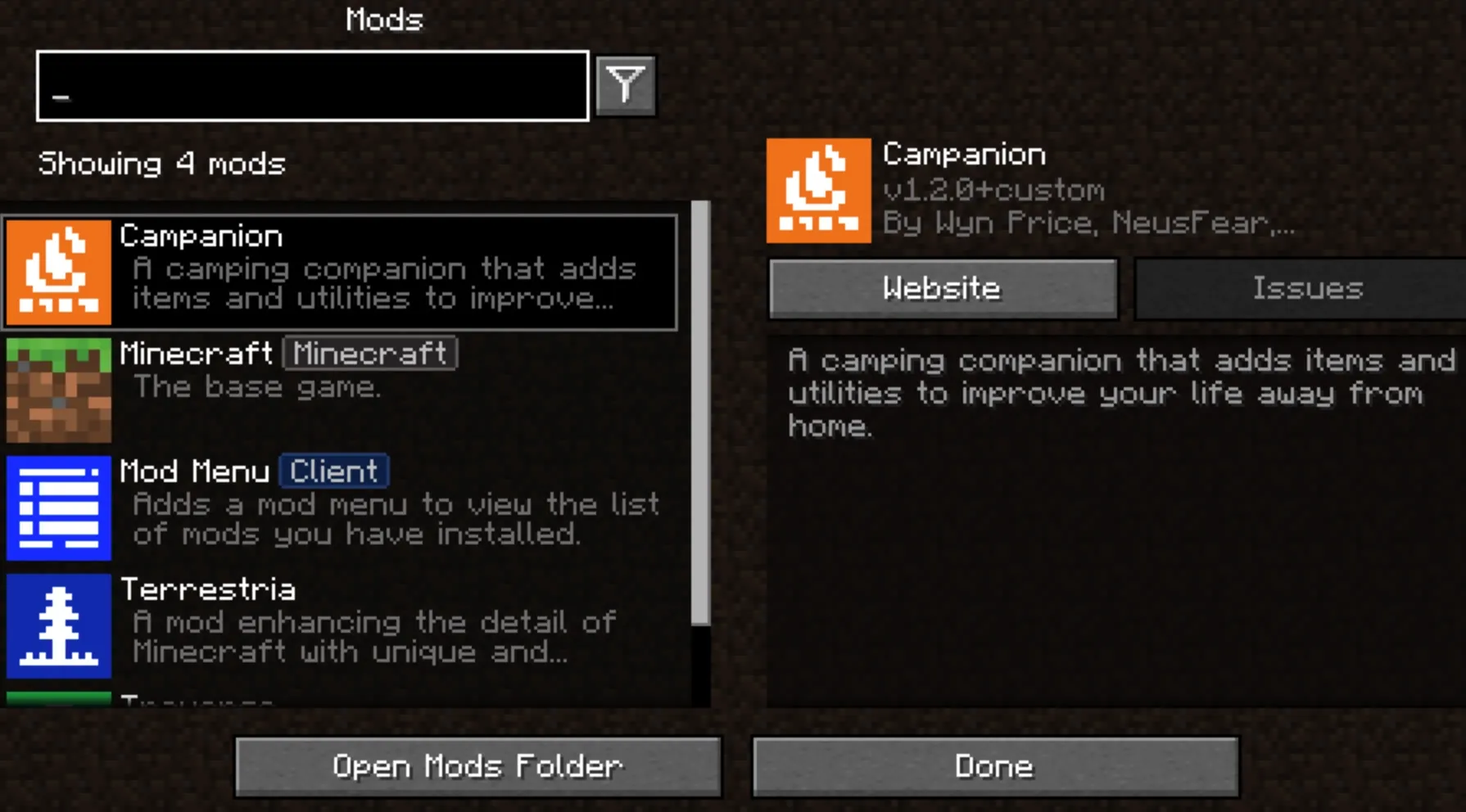
Mod Menu is designed to provide an intuitive interface for viewing and managing your list of installed mods.
The mod not only provides a clear overview of the mods in your current environment but, if supported by the installed mods, also acts as a convenient gateway for quick access to their configuration screens.
Additionally, Mod Menu introduces a range of advanced features to enhance the user experience and mod presentation, including:
Currently, Mod Menu is available for Minecraft Java Edition 1.14 and higher, supporting both Fabric and Quilt loaders.
Mod Menu provides developers with a rich set of API tools designed to optimize how mods are presented in the menu. These tools cover Language Keys, JSON Metadata, and a Java API implemented through code.
You don't need to write any Java code to localize your mod's name, summary, or description. Simply add the translation keys to your language file in the specified format.
Translation API Usage Example
The following is an example of Mod Menu translated into "Pirate Speak." To create translations for your own mod, replace the modmenu at the end of the translation key with your own mod ID (Note: do not replace the modmenu at the beginning). For example: modmenu.descriptionTranslation.traverse.
File: en_pt.json
"modmenu.nameTranslation.modmenu": "Menu o' mods!",
"modmenu.descriptionTranslation.modmenu": "Menu o' mods ye installed matey!",
"modmenu.summaryTranslation.modmenu": "Menu o' mods ye installed matey!" Tip: In this example, the translation for the summary is redundant because it is identical to the content of the description. It is listed here to demonstrate functionality: you can translate the summary (a one-sentence introduction) and the detailed description independently, even in the base English language!
Developers can enrich their mod's presentation by adding specific metadata to their fabric.mod.json file.
All related configuration must be placed within a custom block in fabric.mod.json. Below is a configuration example integrating many of the API's features:
File: fabric.mod.json
{
  ...
  "custom": {
    "modmenu": {
      "links": {
        "modmenu.discord": "https://discord.gg/jEGF5fb"
      },
      "badges": [ "library", "deprecated" ],
      "parent": {
        "id": "example-api",
        "name": "Example API",
        "description": "Modular example library",
        "icon": "assets/example-api-module-v1/parent_icon.png",
        "badges": [ "library" ]
      },
      "update_checker": true
    }
  }
} "badges": [ ])While mods with "environment": "client" set in fabric.mod.json will automatically have the Client badge added, other special badges such as Library and Deprecated must be defined here manually.
Supported badge values include:
library: Should be assigned to mods that exist purely as dependencies for other mods. By default, these mods are hidden from the user unless the user manually toggles the display switch.deprecated: Should be assigned to mods that exist only for historical compatibility reasons, such as older API modules.Please note that any values not listed above will be ignored, and Mod Menu currently does not support custom badges created by developers. If you feel it is necessary to add a new badge type, you can submit an Issue in the project repository for discussion.
"links": { })The links object allows mod authors to add custom hyperlinks to the end of the description text. Notably, if you specified sources in the standard fabric.mod.json metadata, it will also be automatically included in the links section.
Any key in the links object will be added to the link section, and the key itself will be used directly as a translation key. For example:
File: fabric.mod.json
"custom": {
    "modmenu": {
        "links": {
          "modmenu.discord": "https://discord.gg/jEGF5fb"
        }
    }
}
The code above will display a link with the text "Discord," as "Discord" is the English translation provided by Mod Menu for modmenu.discord.
Mod Menu has several built-in default link translation keys, usually following the modmenu.<type> format. You can check the Mod Menu language file for a complete list.
If you wish to add custom links, you can provide your own translations. For any custom keys, make sure to use your own namespace (instead of modmenu) to avoid conflicts.
"parent": "mod_id" or { })Parenting is used to display one mod as a child of another. This is typically used to categorize mods that have been split into multiple modules.
The following example defines the current mod as a child of the 'flamingo' mod:
File: fabric.mod.json
"custom": {
    "modmenu": {
        "parent": "flamingo"
    }
}
Additionally, if you want to group multiple mods under a parent that is not a real mod, you can achieve this by defining a virtual parent. As shown in the following example, a mod defines the metadata for a parent. Ensure all child mods utilizing this fake/virtual parent include this metadata. If a real parent mod exists, this metadata will act as a fallback and will be overridden by the real mod's metadata.
File: fabric.mod.json
"custom": {
    "modmenu": {
        "parent": {
            "id": "this-mod-isnt-real",
            "name": "Fake Mod",
            "description": "Do cool stuff with this fake mod",
            "icon": "assets/real-mod/fake-mod-icon.png",
            "badges": [ "library" ]
        }
    }
}
Virtual parent mods support the following metadata fields:
id (string)name (string)description (string)icon (string)badges (array of strings)"update_checker": false)By default, Mod Menu's update checker uses the hash of your mod JAR file to check Modrinth for the latest version. If a match is found, it further checks if there is an update that supports the current mod loader and Minecraft version. If the new file has a different hash, it will prompt the user to update.
If you wish to disable this feature, you can set update_checker to false in your Mod Menu metadata:
File: fabric.mod.json
"custom": {
    "modmenu": {
        "update_checker": false
    }
} Given that Mod Menu also supports the Quilt loader, all features mentioned in the previous Fabric Metadata API section apply to Quilt mods as well, though with slight differences in the custom metadata format.
In Quilt, you do not need to place the "modmenu" block inside a "custom" block; instead, place it directly as an element of the root object. The structure is as follows:
File: quilt.mod.json
{
  ...
  "modmenu": {
    // Place your links, badges, and other configuration here
  }
} To utilize the Java API, you must add Mod Menu as a compile-time dependency in your Gradle project. This does not force your mod to depend on Mod Menu at runtime but ensures you can test with it in your development environment.
File: build.gradle
// Add the Terraformers Maven repository in the repositories block
repositories {
  maven {
    name = "Terraformers"
    url = "https://maven.terraformersmc.com/"
  }
}

// Add Mod Menu as a dependency in the dependencies block
dependencies {
  // For Minecraft versions before 1.20.6, please use "modImplementation"
  implementation("com.terraformersmc:modmenu:${project.modmenu_version}")
}
Next, define the Mod Menu version you are using in your gradle.properties file. It is recommended to check the official version list for the latest number; note that if you are not using the latest version of Minecraft, you may need to select the corresponding older version of Mod Menu.
File: gradle.properties
modmenu_version=VERSION_NUMBER_HERE Tip: If you do not want to load Mod Menu in your testing environment but still need to compile code that supports the Java API, you can use
modCompileOnlyinstead ofmodImplementation(this works even if Mod Menu hasn't been updated to your current Minecraft version).
To start using the API, you need to implement the ModMenuApi interface on a class and add it as an entrypoint of type "modmenu" in your fabric.mod.json:
File: fabric.mod.json
"entrypoints": {
  "modmenu": [ "com.example.mod.ExampleModMenuApiImpl" ]
} Mods can provide a Screen Factory to open a custom configuration screen when the user clicks the config button. To do this, override the getModConfigScreenFactory method in your API implementation class.
The intended use of this feature is to allow a mod to provide its own configuration screen. The mod ID for the config screen will be determined by the mod container that automatically detects the source of the entrypoint.
Mods can provide screen factories not just for themselves, but for other mods, allowing them to be opened via the config button. To do this, override the getProvidedConfigScreenFactories method in your API implementation class.
A typical use case for this feature is a mod like Cloth Config, which needs to provide configuration screens for other mods that use its API.
Mods can grant other mods the Modpack badge by implementing the attachModpackBadges method. An example is as follows:
@Override
public void attachModpackBadges(Consumer<String> consumer) {
  consumer.accept("modmenu"); // Declares that 'modmenu' is part of the modpack
}
Please note that "internal" mods (such as the base Minecraft install or the mod loader) cannot be given modpack badges as they are generally not included in standard modpack distribution files.
ModMenuApi also provides some convenient static helper methods for mods that wish to integrate better with Mod Menu, such as creating custom "Mods" buttons.
Create Mods Screen Instance
Call this method to directly get an instance of the mod list screen:
Screen createModsScreen(Screen previous) Get Mods Button Text
Call this method to get the text that should be displayed on a Mod Menu-style "Mods" button:
Text createModsButtonText()