
Bedrock
Just Enough Items (JEI) Documentation Just Enough Items (JEI) is an essential utility mod for Minecraft, meticulously engineered for item visualization and reci
Publisher
mezz
Downloads
46
Top category
MOD
Updated
2026-04-27
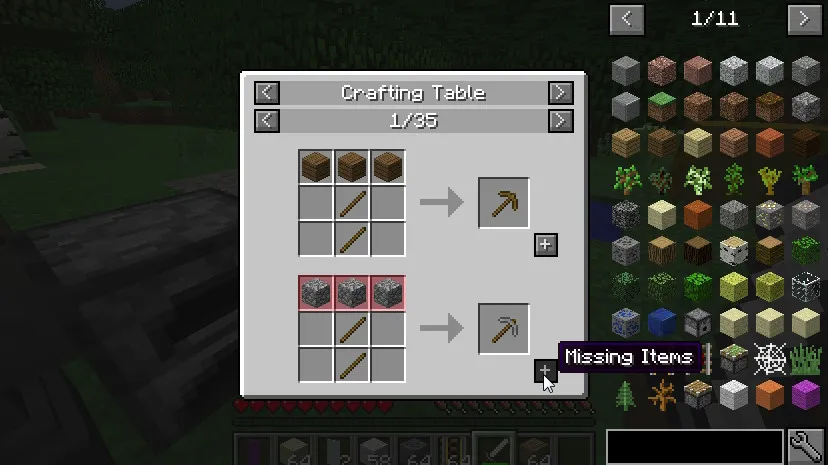
Just Enough Items (JEI) is an essential utility mod for Minecraft, meticulously engineered for item visualization and recipe management. It is built from the ground up to ensure high stability and optimal performance.
Controls
Inventory Settings (Navigate to Minecraft Options -> Controls)
Show Recipes: Hover over the item and press R. Show Uses: Hover over the item and press U. Toggle Item List Overlay: Press Control + O.
Item List Interaction
Show Recipes: Left-click the item or press R. Show Uses: Right-click the item or press U. Next/Previous Page: Use the scroll wheel.
Search Functionality
Select Search Bar: Click the bar or press Control + F. Clear Search: Right-click the search bar. Previous Search: Press the Up Arrow key. Search by Mod Name: Type @ before your keyword (e.g., @thaum). Combine Search Terms: Use multiple terms simultaneously (e.g., wand @thaum). Exclude Search Terms: Add a - symbol before the keyword (e.g., @thaum -wand). Search Terms with Spaces: Enclose the words in quotation marks (e.g., "two words").
Recipe View
Next/Previous Page: Use the scroll wheel. Show All Recipes: Click the name of the recipe category. Transfer Items to Crafting Grid: Click the [+] button. Shift-Click for moving multiple sets.
Advanced Search Syntax
Search by Tooltip Only: Type # before the keyword. Search by OreDict Name: Type $ before the keyword. Search by Creative Tab: Type % before the keyword. Multiple Searches: Separate terms with the | character (e.g., "wrench|hammer").
Cheat Mode Enabled
Acquire a Full Stack: Left-click the item. Acquire a Single Item: Right-click the item. Delete Item: Drop the item into the Item List area.
Item List Edit Mode Enabled (Controls are displayed in the in-game item tooltip)
Hide Item: Control + Left-click the item. Hide Item and Sub-Items: Control + Right-click the item. Hide All Items from a Mod: Control + Shift + Left-click the item.
FAQ
Can I include JEI in my mod pack? Absolutely, feel free to do so!
Can JEI run as a client-only mod or on a vanilla server? For version 1.21.1 and below, yes, though some features will be disabled:
For versions 1.21.2 and above: Since Minecraft 1.21.2, recipes are stored on the server side rather than the client side. Consequently, you must install JEI and the supporting loader (NeoForge/Fabric) on the server to synchronize recipe data with the client successfully.