Cobblemon Minimap Icons
Resource Overview
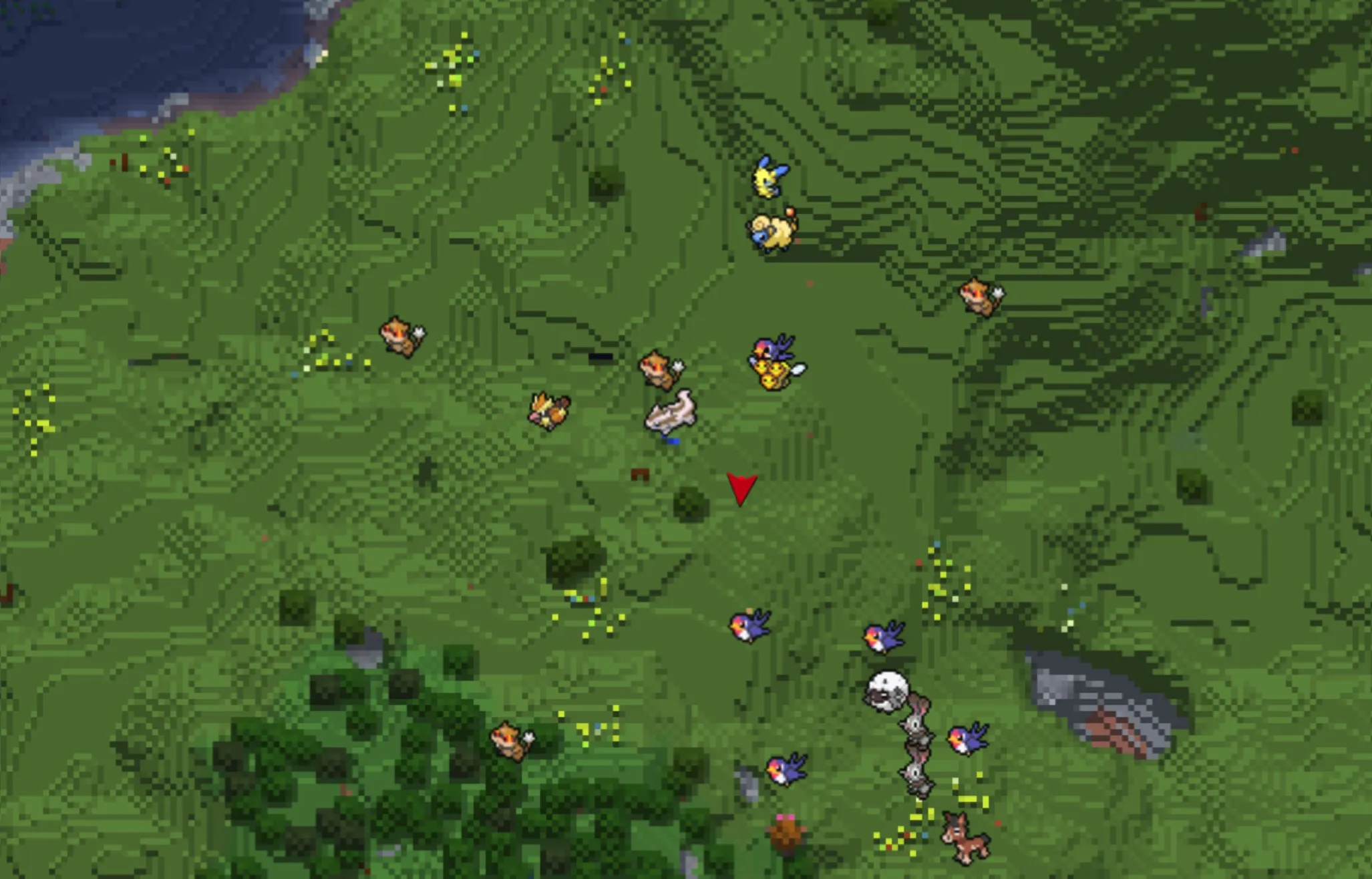
This resource pack is designed to integrate MBCMechachu's Cobblemon icons into Xaero's Minimap, providing a refined visual upgrade and improved navigational clarity for your gameplay.
Key Features
- Comprehensive Coverage: Includes an unmarked shiny version.
- Form Support: Contains a full list of unique forms and provides complete compatibility with all Cobblemon form variations.
- Extensive Compatibility: Supports a wide range of additional resource packs.
Supported Addon List
The following is a list of addons and expansions supported by this pack:
Official & Remodels
- Combee MC Remodel
- Vivillon Pride Patterns
Fakemon
Pokémon Expansions
- AllTheMons
- AllTheMons x Mega Showdown
- AllTheMons x Mega Showdown Radiants
- Alphabet Soup
- Ascension Megamons
- Baby Legends
- CloudMons
- CobbleCats
- Cobbled Variants
- Cobblemon Cafe
- Cobblemon: Exploration Day
- Cobblemon: MC Swords for Honedge Line
- Cobblemon: Mega Showdown
- Colorable Forretress Shulker Boxes
- Eternal Floette
- Flower Expansion
- GenoMons
- Gholdengo Shiny Fix
- HiddenMons
- Hydro's Reanimodel Pack
- Kale's Collection
- LackingMons
- MissingMons
- MoreMons
- MundialMons ReaniPack
- MysticMons
- Navas' ZAmega
- NotSoCobblemon Allone's Additions
- OdysseyMons
- Pigeon's PokePack
- Pokemans Pack
- Rotom Appliances
- SaltMons
- The Jewel Pokemon
- Torterras O' Plenty
- WaviMons
(Note: A Big Icon version is coming soon.)
Setup Guide
1. Keeping Entity Icons Visible
To ensure Pokémon icons are correctly displayed on your map, follow these steps:
- Enter your world and press "Y" to open "Minimap Settings".
- Select "Entity Radar Settings".
- Change "Display Icons" to "Always".
- Adjust "Entity Icon Scale" to a size that is comfortable for your viewing.
2. Displaying Only Pokémon Icons
If you wish to hide other entities and show only Pokémon on the minimap, follow these steps:
- Navigate to the .minecraft/config/xaero/minimap folder and open "default_radar_categories_client.json".
- Replace
"hardInclude": "anything" with "hardInclude": "nothing".
- Replace
"includeList": [] with "includeList": ["cobblemon:pokemon"].
3. Using With Other Packs
- "Combee MC Remodel" should be placed above this pack.
- All other packs should be placed below this pack to ensure proper load order and display priority.