BSL Shaders
Gallery
Resource Images
Overview
Resource Description
An advanced shader pack for Minecraft: Java Edition. Known for its bright, colorful, and unique visual style.
About This Project
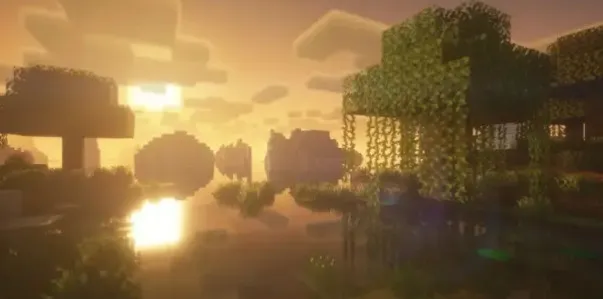
BSL Shaders is a custom shader pack tailored for Minecraft: Java Edition. It is renowned for its bright, color-saturated, and highly distinctive visual style.
This shader pack includes an incredibly rich set of visual enhancements, including but not limited to: real-time dynamic shadows, volumetric lighting, ambient occlusion (AO), bloom effects, highly customizable cloud and water rendering, and built-in anti-aliasing.
In addition, to cater to the aesthetic preferences of different players, BSL offers a wide range of optional effects, such as depth of field, motion blur, specular and normal map support, celshading, and world curvature, all aimed at bringing a fresh and immersive experience to your blocky world.
Quick Navigation
- Official Website (capttatsu.com): The project's official home base. You can find detailed feature explanations, FAQs, and changelogs here.
- Social Media: Follow my Bluesky and X (Twitter) accounts for the latest news and teasers regarding shader development.
- Join the Discord Server: Welcome to join our community for in-depth discussions, questions, feature suggestions, or bug reporting.
- Support the Creator: If you enjoy this shader pack, consider supporting me on Patreon to help the project continue to grow.
Usage Agreement
To maintain a healthy community environment, please adhere to the following terms of use:
Permissions:
- You have the right to use this shader pack for in-game screenshots and video recording.
- You have the right to modify the configuration or code of this shader pack for personal use.
- You have the right to publicly release heavily modified versions, provided you have obtained my explicit permission.
Restrictions:
- Strictly prohibited to redistribute this shader pack without my permission.
- Strictly prohibited to claim this shader pack (or its code) as your own work, or to rebrand/rename it and release it as a new project.
- Strictly prohibited to use any profit-generating link shorteners for my website or file download pages.
Installation Guide
Please follow these steps to deploy BSL Shaders into your game:
- Prepare the Environment: Download and install the OptiFine or Iris mod (this is a prerequisite for running shaders).
- Download the File: Download the BSL Shaders pack file.
- Install the File: Place the downloaded zip file directly into your
.minecraft\shaderpacksfolder (no need to unzip). - Launch the Game: Open the Minecraft Launcher and start the game.
- Enable Shaders: Navigate to "Options" -> "Video Settings" -> "Shaders".
- Activate: Select BSL Shaders from the list and enjoy your brand new perspective.
Download
Get this resource
More In Category