Join Minecraft at TwitchCon
Heading to TwitchCon? Here’s your guide to securing your cape!
Minecraft is coming to TwitchCon in Rotterdam on May 30, and we have prepared some thrilling content for those joining us on-site. Beyond our main stage Minecraft LIVE broadcast (which will also be streamed online), we have a variety of activities and rewards awaiting you. Get ready for more reveals, meet & greets, and endless fun!
For those attending in person, one highlight you absolutely do not want to miss is the exclusive Crafter Cape. To help you plan your event experience, we have put together a step-by-step guide on how to earn your cape.
Remember, the goal is to enjoy the quest. This offer is available throughout the weekend, and with no limit on the total number of capes to be distributed (though limited to one per attendee), there is no need to rush.
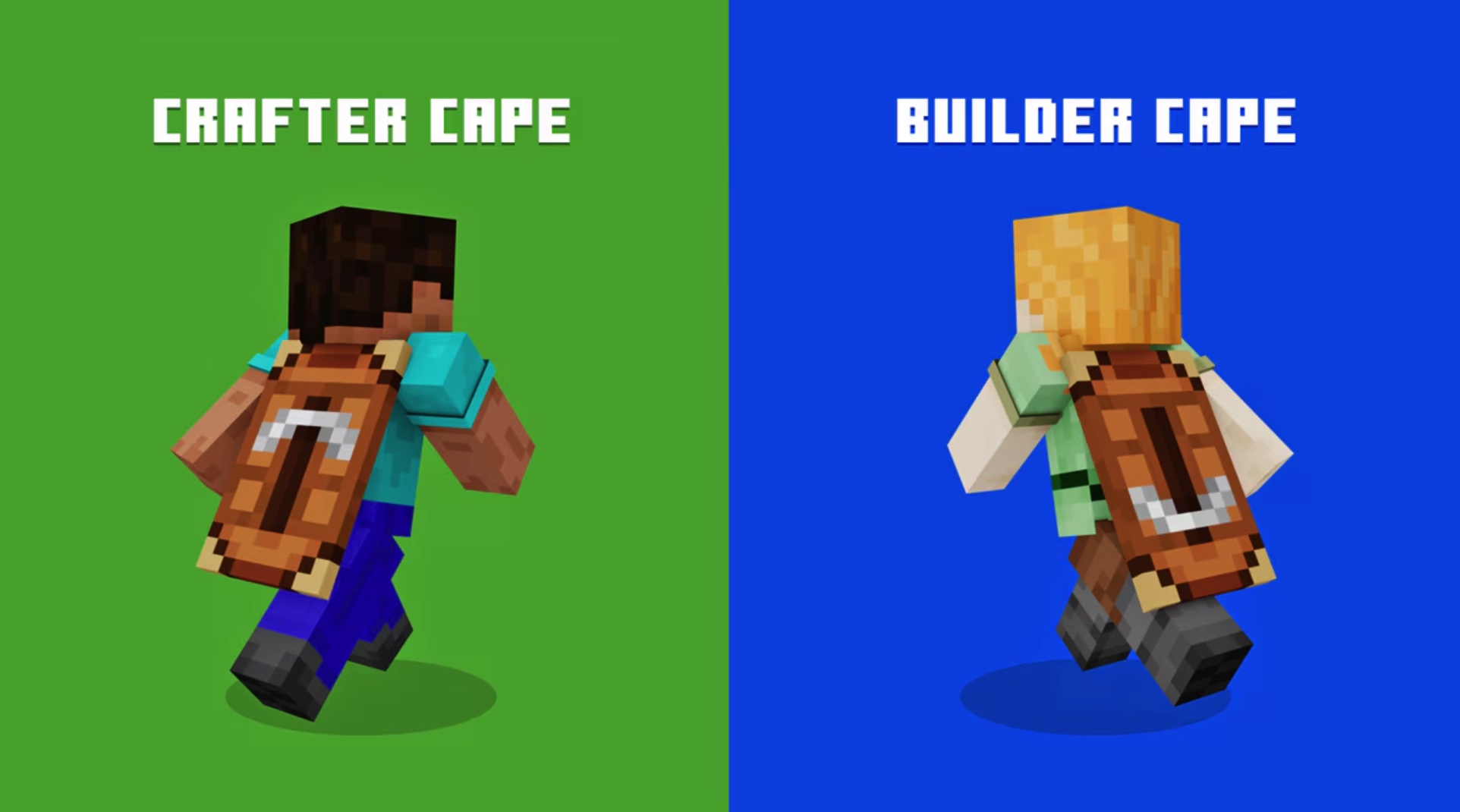
Here is everything you need to know to start collecting your Emerald Stickers and claim the Crafter Cape!
Step 1: Get your Inventory Ribbon
Before you begin collecting emeralds, you will need somewhere to store them. The Inventory Ribbon is a specially designed lanyard attachment that clips onto your TwitchCon badge. It features three empty slots dedicated to holding the Emerald Stickers you earn.
You can pick up your Inventory Ribbon at the Swag Bag kiosk, located directly next to the badge and wristband pickup area. A Brand Ambassador will provide one to you upon arrival. Each attendee is entitled to one ribbon, so please ensure it remains attached to your badge at all times.
Step 2: Collect Emerald Stickers
To qualify for the cape, you must collect three Emerald Stickers. You can earn these by participating in various Minecraft experiences throughout the event.
There are two primary ways to earn stickers:
1. Attend Minecraft sessions
Look for sessions tagged with “Minecraft Emerald” on the schedule or marked with emerald signage outside the room. Upon entering a qualifying session, you will receive one Emerald Sticker.
Saturday sessions include:
- The Midoffs LIVE presented by Tubbo (Minecraft Arena)
- Skyblock Kingdoms SMP - Minecraft in the Sky! (NomNom Theatre)
- Crafting a Character (NomNom Theatre)
- The Symbiotic Relationship of Artists and Creators (NomNom Theatre)
- The Non-Competitive Competitive Format of Minecraft Events (NomNom Theatre)
- Minecraft LIVE (Twitch Rivals Arena)
Sunday sessions include:
- Bannerfall SMP: A Clash Between Kingdoms (NomNom Theatre)
- Couriway's 10,000th Speedrun Live (Minecraft Arena)
- Lifesteal SMP: Inside Minecraft's Deadliest Server (Glitch Theatre)
- Gridlock: The Next Step in Minecraft Esports (Minecraft Arena)
- The Minecraft Gauntlet (Glitch Theatre)
2. Join Minecraft activities
Head over to the Minecraft Arena and participate in activities such as gameplay stations, creative challenges, and photo opportunities. Once you complete an activity, you will earn a sticker.
Qualifying activities include:
- The Sulfur Slide
- Be the Chicken Jockey
- Game Over Photo Op
- Dungeons 2 Note Block Challenge
- Dungeons 1 Gameplay
- Chicken Farm Gameplay
Regardless of how you choose to participate, the rules are simple:
- You will receive one sticker per session or activity.
- Feel free to mix and match; for example, three sessions, three activities, or any combination in between.
- Repeating the same session or activity will not earn additional stickers, so be sure to try a variety of things if you have your sights set on the cape.
Once you have earned a sticker, place it in an empty slot on your Inventory Ribbon. Once all three slots are filled, you are ready to proceed to the final step.
Step 3: Redeem Your Cape
After filling all three slots with Emerald Stickers, it is time to claim your Crafter Cape! Head to the Cape Trader, located within the Minecraft Village in the Arena. This is where you can redeem your prize and receive any support needed for your quest.
The process is as follows:
- A team member will verify your completed ribbon.
- Your wristband will be scanned to confirm your participation.
- You will receive a Cape Card, which includes a unique in-game code for your Minecraft cape.
That concludes the TwitchCon quest! Now, simply input your code at the official redemption page by June 30, and your cape will become available in your Dressing Room.
Everyone gets a chance
You can earn Emerald Stickers on both Saturday and Sunday. While each attendee can only claim one cape, there is no limit to the number of capes distributed. Enjoy the activities at your own pace; there is no pressure to complete everything in a single day. There is plenty of time and variety to finish your quest, so make sure to prioritize having a good time. Just be sure to keep your Inventory Ribbon safe while you are sliding slimes and recreating your most memorable Game Over scene.
Final tips to remember
To maximize your experience:
- Watch for the “Minecraft Emerald” tag on the schedule or look for emerald signage to identify qualifying sessions and events.
- Keep your ribbon safe; you only receive one, and it is required to redeem your cape.
- Ask the Cape Trader for assistance if you have questions or encounter any issues.
What if I can’t attend TwitchCon?
We understand that not everyone can attend in person, but rest assured, we have something cool prepared for you as well: an alternate cape that you can earn online! Tune in to Minecraft LIVE on May 30 at 11:30 am EDT / 5:30 pm CEST to learn how you can get the Builder Cape.