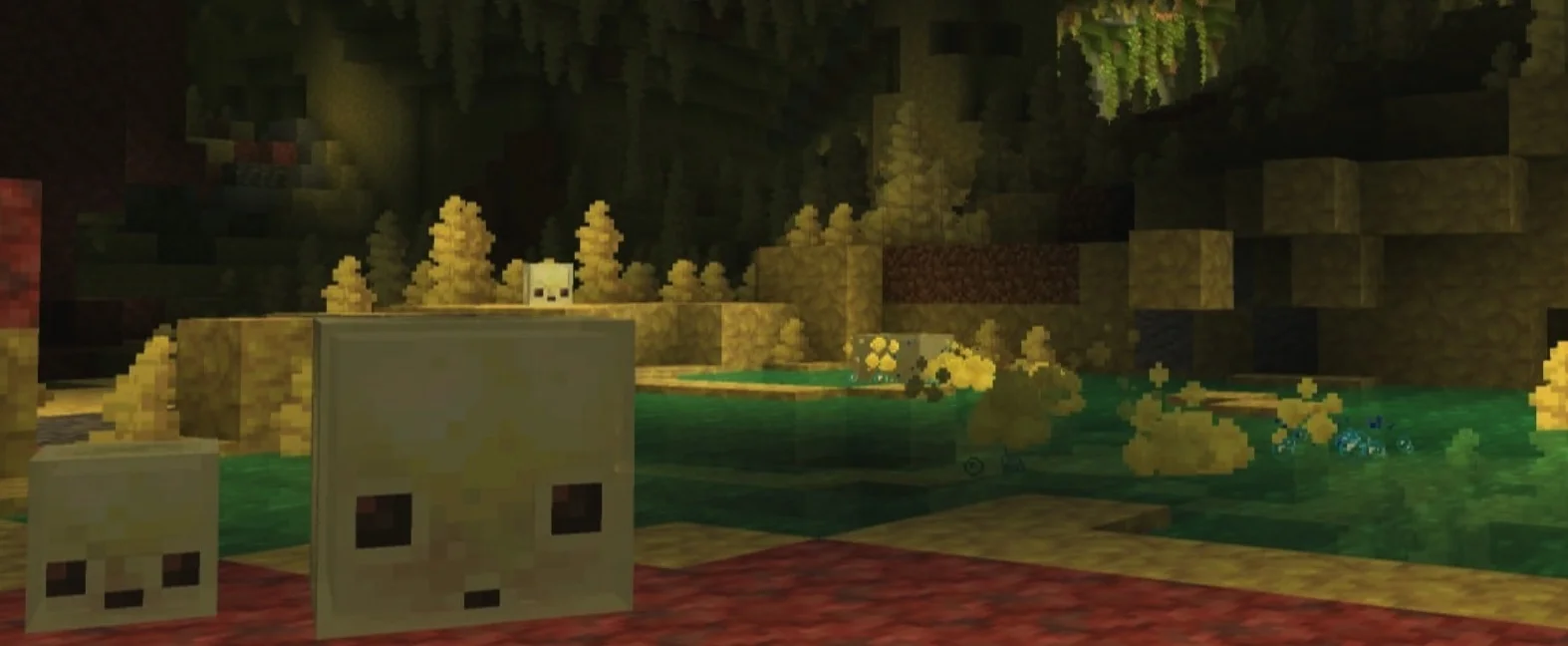
26.2 is the official release of the Chaos Cube update, as well as a minor update for the Java Edition, released on June 16, 2026[1]. This update introduces Sulfur Caves, Sulfur, Cinnabar, and Sulfurbots, along with several bug fixes.
New Content
Blocks
Sulfur
- Generates naturally in Sulfur Caves.
- Available in stair, slab, and wall variants.
- Available in polished, brick, and chiseled variants.
- The appropriate tool for mining is a pickaxe.
Polished Sulfur
- Polished variant of Sulfur.
- Available in stair, slab, and wall variants.
Sulfur Bricks
- Brick variant of Sulfur.
- Available in stair, slab, and wall variants.
Chiseled Sulfur
- Chiseled variant of Sulfur.
Volatile Sulfur
- Generates naturally in sulfur pools and sulfur springs within Sulfur Caves.
- Generates bubbles in the 4 water source blocks above it.
- If there are fewer than 4 water source blocks above, the bubbles reach the surface and produce yellow particles within a 3-block radius; players entering this area receive the Nausea effect.
- Can be crafted using 9 Sulfur.
- When placed beneath 1-4 blocks of water, waterlogged scaffolding, or waterlogged blocks without collision volume—provided the block above the water is air or a block without collision volume—the water surface forms a geyser. When erupting, geysers behave similarly to bubble columns, pushing entities above them upward.
- When placed above Magma Blocks, geysers erupt periodically; the duration of eruption and dormancy is determined by the block's position.
- When placed above Lava Sources, geysers erupt continuously, though the sound is slightly quieter than when placed above Magma Blocks.
Cinnabar
- Generates naturally in Sulfur Caves.
- Available in stair, slab, and wall variants.
- Available in polished, brick, and chiseled variants.
- The appropriate tool for mining is a pickaxe.
Polished Cinnabar
- Polished variant of Cinnabar.
- Available in stair, slab, and wall variants.
Cinnabar Bricks
- Brick variant of Cinnabar.
- Available in stair, slab, and wall variants.
Chiseled Cinnabar
- Chiseled variant of Cinnabar.
Sulfur Spikes
- A block similar to Pointed Dripstone.
- Generates naturally on Sulfur in the Sulfur Cave biome.
- Placed as a stalactite when attached to the bottom of a block, and as a stalagmite when placed on the top surface.
- Under specific conditions, stalactites grow slowly if there is Sulfur above them, causing stalagmites to grow slowly on the block below; stalactites can grow up to two blocks high.
- Adjacent stalagmite tips and stalactite tips connect to form a stone column, unless placed while holding ⇧ Shift.
- Stalagmites are destroyed if they lack a supporting block underneath.
- Unlike Pointed Dripstone, falling onto the tip of a stalagmite does not increase fall damage.
- Stalactites become falling blocks if they lack a supporting block above.
- Falling stalactites deal significant damage to entities.
- Stalactites do not drip water or lava like Pointed Dripstone.
- Can be destroyed by being hit with a trident.
Items
Sulfurbot Bucket
- Obtained by using a bucket on a medium-sized Sulfurbot.
- Releases the Sulfurbot when used on a block.
Music Disc
- Added a new music disc, "Bounce".
- Composed by fingerspit.
- Can be found in minecarts inside abandoned mineshafts within Sulfur Caves.
- Rarity is "Uncommon".
- Outputs a redstone signal strength of 8 when used with a Redstone Comparator.
Spawn Egg
- Added a Sulfurbot spawn egg.
Mobs
Sulfurbot
- A new friendly mob.
- Generates naturally in Sulfur Caves.
- When a player interacts with it while holding a block, it absorbs the block and disables its own AI.
- When a player interacts with a Sulfurbot containing a block while holding shears, the block is sheared off and the mob's AI is re-enabled.
- Follows players holding blocks it can absorb.
- Searches for nearby block item entities and moves toward them to absorb them.
- Splits into two small Sulfurbots upon death.
- Small Sulfurbots can be attracted and fed with Slimeballs to grow into medium-sized Sulfurbots.
- When containing a block, it acts as an object that can be interacted with by players through attacking or pushing, and it does not take fall damage or damage from players.
- Sulfurbots containing blocks have 13 different prototypes with varying physical properties.
- Medium-sized Sulfurbots can be picked up with a bucket.
- Dispensers can be used to make them absorb or swap blocks, and shears can be used to remove the contained block.
- Dispensers can spawn a Sulfurbot using a Sulfurbot Bucket.
World Generation
Sulfur Caves
- A new cave biome.
- Generates underground or on the surface in non-river biomes.
- Less common beneath oceans, hills, or mountains.
- Composed of Sulfur and Cinnabar.
- Generates sulfur pools containing small amounts of Volatile Sulfur.
- Generates clusters of Sulfur Spikes.
- Sulfurbots and Cave Spiders spawn here.
Sulfur Springs
- A new feature.
- Generates above the Sulfur Cave biome.
- Composed of Sulfur, Volatile Sulfur, Stone, Granite, Tuff, and Magma Blocks.
- Available in 4 size variants:
- Small
- Medium
- Large
- Extra Large
Gameplay
Music
- Added 5 new music tracks composed by fingerspit.
- Shores
- Plays in Dripstone Caves, Flower Forests, Forests, Snowy Forests, Lush Caves, Old Growth Pine Taigas, Old Growth Spruce Taigas, and Sulfur Caves.
- Memories
- Plays in Badlands, Cherry Groves, Deserts, Flower Forests, and Forests.
- Nightly
- Plays in Cherry Groves, Dripstone Caves, Frozen Peaks, Jagged Peaks, Snowy Slopes, Stony Peaks, and Sulfur Caves.
- Home
- Plays in Bamboo Jungles, Cherry Groves, Frozen Peaks, Jungles, Meadows, and Sparse Jungles.
- Ebb
- Plays in Dripstone Caves, Frozen Peaks, Jagged Peaks, Sulfur Caves, and Swamps.
- All new tracks play in the main menu and in Overworld biomes without specific music.
- Shores
Sulfurbot Prototypes
- Prototypes are distinguished by speed after being hit, bounciness when colliding with blocks or collidable entities, ground friction, air resistance, and buoyancy in water.
- Each prototype has unique hit and push sound effects.
- Current prototypes include:
- Normal: Medium speed, medium bounciness, medium ground friction, and low air resistance.
- Has buoyancy.
- Used when absorbing earth-type blocks.
- Bouncy: High speed, high bounciness, medium ground friction, and low air resistance.
- Has buoyancy.
- Used when absorbing wood-type blocks.
- Slow Bouncy: Low speed, high bounciness, medium ground friction, and medium air resistance.
- Used when absorbing stone and mineral-type blocks.
- Slow Sliding: Low speed, low bounciness, medium ground friction, and medium air resistance.
- Used when absorbing metal blocks.
- Fast Sliding: High speed, low bounciness, medium ground friction, and low air resistance.
- Used when absorbing organic blocks.
- Light: Low speed, high bounciness, medium ground friction, and high air resistance.
- Has buoyancy.
- Used when absorbing wool blocks.
- Fast Gliding: High speed, no bounciness, low ground friction, and low air resistance.
- Used when absorbing ice-type blocks.
- Slow Gliding: Low speed, no bounciness, low ground friction, and low air resistance.
- Used when absorbing mushroom-type blocks.
- Normal: Medium speed, medium bounciness, medium ground friction, and low air resistance.
- Additionally, there are 4 special prototypes:
- High Resistance: Very slow, low bounciness, high ground friction, and low air resistance.
- Used when absorbing Soul Sand and Soul Soil.
- Sticky: Same properties as the Fast Sliding prototype, but with extremely high ground friction and no bounciness to simulate stickiness.
- Used when absorbing Honeycomb Blocks.
- Explosive: Similar properties to the Normal prototype, but with slightly higher air resistance; can be ignited and explode.
- Used when absorbing TNT.
- Absorbed TNT can be activated by redstone, fire, or nearby explosions.
- When activated by fire or redstone, the absorbed TNT explodes after 6 seconds.
- When activated by an explosion, the absorbed TNT explodes after 0.75-3 seconds.
- Activated TNT Sulfurbots cannot be picked up with a bucket.
- Activated TNT Sulfurbots are immune to most damage.
- Activated TNT blocks cannot be removed with shears.
- Does not split into small Sulfurbots upon explosion.
- Hot: Same properties as the Normal prototype, but damages entities upon contact like a Magma Block.
- Used when absorbing Magma Blocks.
- High Resistance: Very slow, low bounciness, high ground friction, and low air resistance.
Advancements
- Added 1 new advancement:
- Broken
- Obtained by having a Sulfurbot absorb TNT.
- Broken
Game Events
- Added
minecraft:bounce.- Emitted when an entity with non-zero bounciness collides with a block or collidable entity.
- Vibration frequency is 2.
Damage Types
- Added damage type
minecraft:sulfur_cube_hot, used for contact with Sulfurbots that have absorbed Magma Blocks to generate new death messages.
Particles
- Added the following particles:
sulfur_cube_goosulfur_bubblesnoxious_gasnoxious_gas_cloudgeysergeyser_poofgeyser_basegeyser_plume
Command Format
/unpublish
- If currently an integrated server, cancels opening the world to LAN.
General
Splashes
- Added the following splashes:
- Now on Vulkan 1.2!
- Music by fingerspit!
Languages
- Added Chuvash, Swiss French, Gallo, Uzbek, and Võro.
Options
- Added a "Graphics API" option in Video Settings.
- Options include "Default", "Prefer Vulkan (Experimental)", and "Prefer OpenGL".
- Currently, "Default" is equivalent to "Prefer OpenGL", which may change in the future.
- Mojang recommends "Default" for all users, except when troubleshooting issues.
- "Prefer Vulkan (Experimental)": Attempts to use Vulkan rendering, falling back to OpenGL if unavailable.
- "Prefer OpenGL": Attempts to use OpenGL rendering, falling back to Vulkan if unavailable.
Graphics API
- The game can now use Vulkan for rendering.
- Some older hardware and drivers do not support Vulkan, in which case it falls back to OpenGL.
- System requirements for Vulkan rendering are Vulkan 1.2 with support for dynamic rendering and push descriptors, though this may change.
- Vulkan rendering is currently experimental; performance and stability may be poor.
- When using Vulkan, the game prioritizes dedicated GPUs over integrated ones, unlike when using OpenGL.
- The current rendering Graphics API can be viewed in the debug overlay under "system_specs".
- On macOS, the game uses MoltenVK to translate Vulkan to Metal.
Friends List
- Added a Friends List, accessible via the "Friends" button on the main menu or in-game menu.
- The Friends List can be opened via a shortcut (default is O).
- The Friends button displays a notification badge with the number of friend requests, up to 5, after which it displays "more".
- The Friends List is presented as an overlay with two tabs:
- Friends: Displays current friends, where you can remove friends or send friend requests by entering a player's profile name.
- Requests: Displays received friend requests (accept or decline) and sent friend requests (cancel).
- Friend online status is displayed below their name, with four states:
- Offline
- Online
- In a world
- In a joinable world
- Actions such as sending, accepting, declining, and canceling are confirmed in the interface; clear error messages appear if the service is unreachable, rate-limited, or if the requested profile name does not exist.
- Changes to friends during gameplay are notified via pop-ups:
- Friend request sent;
- Friend request received;
- Another player accepted a request sent by the player.
- Pop-up notifications display the player's skin face if available.
- The Friends List checks for updates once per minute while open, otherwise every 5 minutes.
- A confirmation dialog appears the first time the Friends button is shown on the title screen, asking if the player agrees to use the Friends List.
- Friends List, player request privacy, and Microsoft account safety settings links are managed in the new Friends List section under "Online Options".
- If a player sets their chat settings to "Friends Only" in their Xbox profile, they will only receive chat messages from friends.
- Known issues:
- Canceling a friend request before the recipient accepts may cause the recipient's acceptance list to be out of sync.
- The recipient will still see the friend request, but accepting it will turn it into a request to the sender.
- Declining a friend request causes the sender's sent list to be out of sync.
- The sender must also cancel the friend request to restore the correct sync state.
- If a player has the Friends List enabled but has disabled the "Allow Requests" setting, other players cannot accept their friend requests.
- If a player's Xbox profile chat setting is "Friends Only", they will not see their own chat messages.
- Canceling a friend request before the recipient accepts may cause the recipient's acceptance list to be out of sync.
Data Packs
- Added the
minecraft:sulfur_cube_archetyperegistry, with the following default values:regularbouncyslow_bouncyexplosiveslow_flatfast_flatlightfast_slidingslow_slidinghigh_resistancestickyhot
- Format: Object with fields:
items: Item tag containing all items that can be fed to the corresponding Sulfurbot prototype.buoyant: Boolean determining if the Sulfurbot floats in fluids.attribute_modifiers: List of objects:attribute: Attribute to modify.id: Modifier ID.amount: Value for modifier calculation.operation: Method for modifier calculation, must be one ofadd_value,add_multiplied_base, oradd_multiplied_total.
explosion: Optional field; if present, this Sulfurbot prototype explodes:fuse: Positive integer, ignition time for the explosion.power: Non-negative integer, explosion power.causes_fire: Boolean, whether the explosion creates fire.
contact_damage: Optional field; if present, this Sulfurbot prototype deals damage when an entity attempts contact:amount: Non-negative float, amount of damage dealt.